Social Media Character Limits 2026: Master Table
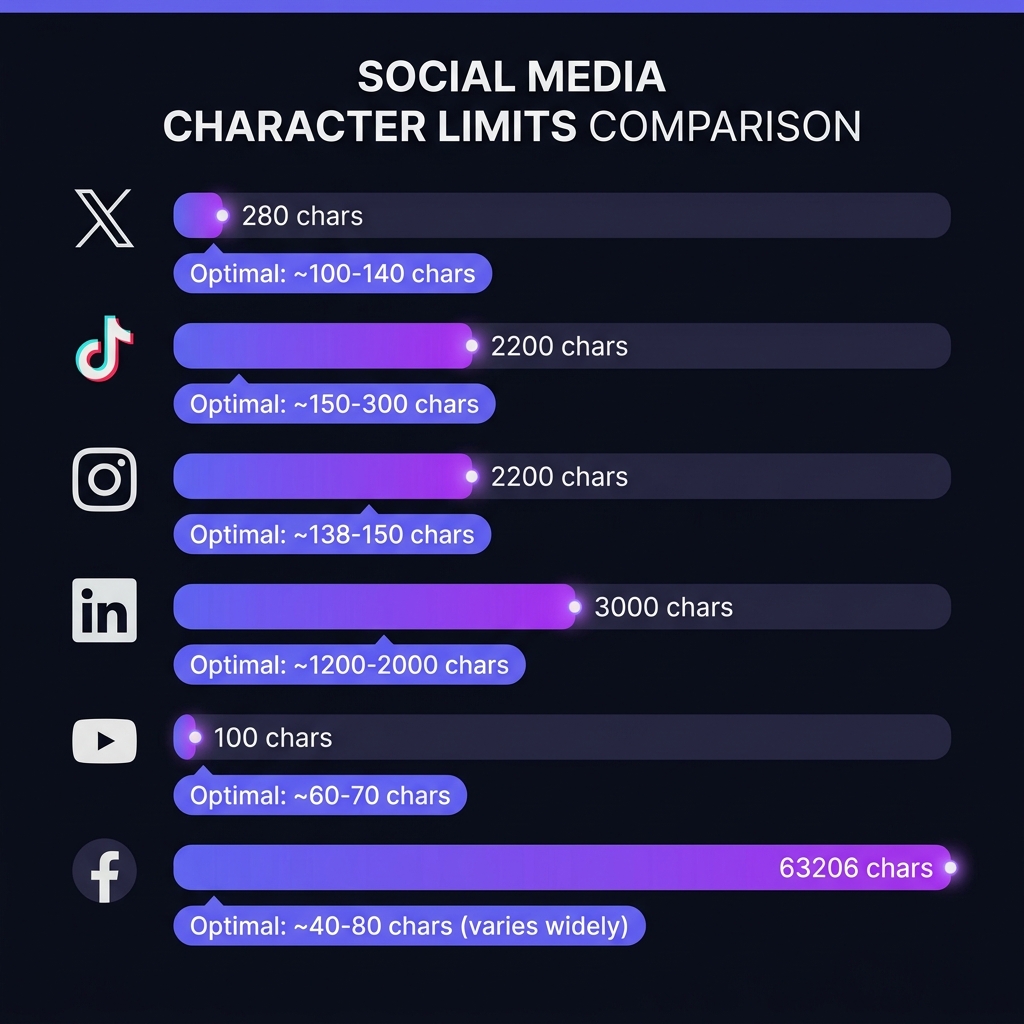
Knowing the technical character limit of each social network is only half the job. The real limit that matters — the one that determines whether your post reaches its engagement potential — is the optimal range: the character count at which each platform's algorithm starts truncating or penalizing your content.
Master Character Limit Table 2026
Why the Technical Limit Is Never the Real Limit
The most common mistake community managers make is confusing the technical limit with the effective limit. Twitter allows 280 characters, but SproutSocial and HubSpot engagement studies show the highest-performing tweets contain 71–100 characters. The reason: shorter tweets leave room for audiences to add their own comment when retweeting, and they're visually more readable in the feed.
The Invisible Truncation: The Real Limit
Every platform has a truncation point where only the beginning of your text is shown, followed by "see more" or "...". This is the real limit that determines how much of your message is visible without any user action. The first visible characters are the only ones guaranteed to every viewer. Everything after the truncation point depends on the user choosing to click.
Practical rule: put the hook, the value proposition, or the call to action before the truncation point. What comes after should complement, not contain, the main message.
How to Count Characters Across Multiple Platforms
If you're managing content for multiple social networks simultaneously, the most efficient workflow is:
- Draft the primary copy in WordCount Pro and verify character count in real time.
- Identify the truncation point for each target platform (see table above).
- Make sure the key message fits before that truncation point.
- Adapt, don't copy: each platform has a different voice and their algorithms penalize identical content posted simultaneously.
Special Characters and Emojis
An important technical detail: most platforms count emojis as 2 characters (some compound emojis can count as 4 or more). Line breaks also count as 1 character each. On tight-limit platforms like Twitter, this can mean a difference of 10–20 characters if you use emojis frequently.
💡 WordCount Pro Usage Tip
WordCount Pro distinguishes between characters with spaces and without spaces. For social media, use the with spaces count, as all platforms count spaces as characters.
Frequently Asked Questions
Does Twitter/X count URLs within the 280-character limit?
Yes, but Twitter automatically shortens any URL to 23 characters via its t.co system. This means regardless of the original URL length, it will always consume exactly 23 of your 280 characters.
Do hashtags count toward Instagram's character limit?
Yes, every hashtag counts as its characters plus the # symbol. That's why the common practice is to place hashtags at the end of the description or in the first comment, so they don't interfere with the main copy's character count.
Do characters affect LinkedIn's organic reach?
Not directly, but length correlates with reach. LinkedIn posts between 1,200 and 1,600 characters have greater organic reach than shorter ones, according to studies by algorithm expert Richard van der Blom. The algorithm prioritizes posts that generate reading time.
Conclusion
The technical limit is the ceiling. The optimal range is the floor. Your goal as a content creator is to always work within that optimal range: long enough to add value, short enough for the full message to be visible without any extra friction for the user.